

SiteBuddy
A personal log of insulin-pump site rotation for iPhone, built first for Omnipod® wearers.
It records where each pod goes and which way it points, and shows your recent sites on a front and back body map.
Coming soon on the App Store
- iPhone, iOS 26 or later
- English and Italian
- No account
Why SiteBuddy
Where did the last few pods go?
Rotating sites is part of living with an insulin pump. Using the same spot too often can irritate the skin and lead to lipohypertrophy, a lumpy thickening under the skin that can make insulin absorption less predictable. With a pod changed every few days, “where did the last ones go?” is hard to answer from memory.
Omnipod adds a twist. Insulet lists the back of the upper arm, the belly and its sides, the front and outer thigh, the lower back (for adults, in Omnipod 5 material) and the upper buttocks as pod sites, and wearers also vary the direction a pod points. SiteBuddy records both, so your history shows which spots, and which directions, you have used recently.
-
28 built-in sites, 14 on each side
-
4 pod directions: up, down, inward and outward
-
2 body views, front and back, whole or zoomed in
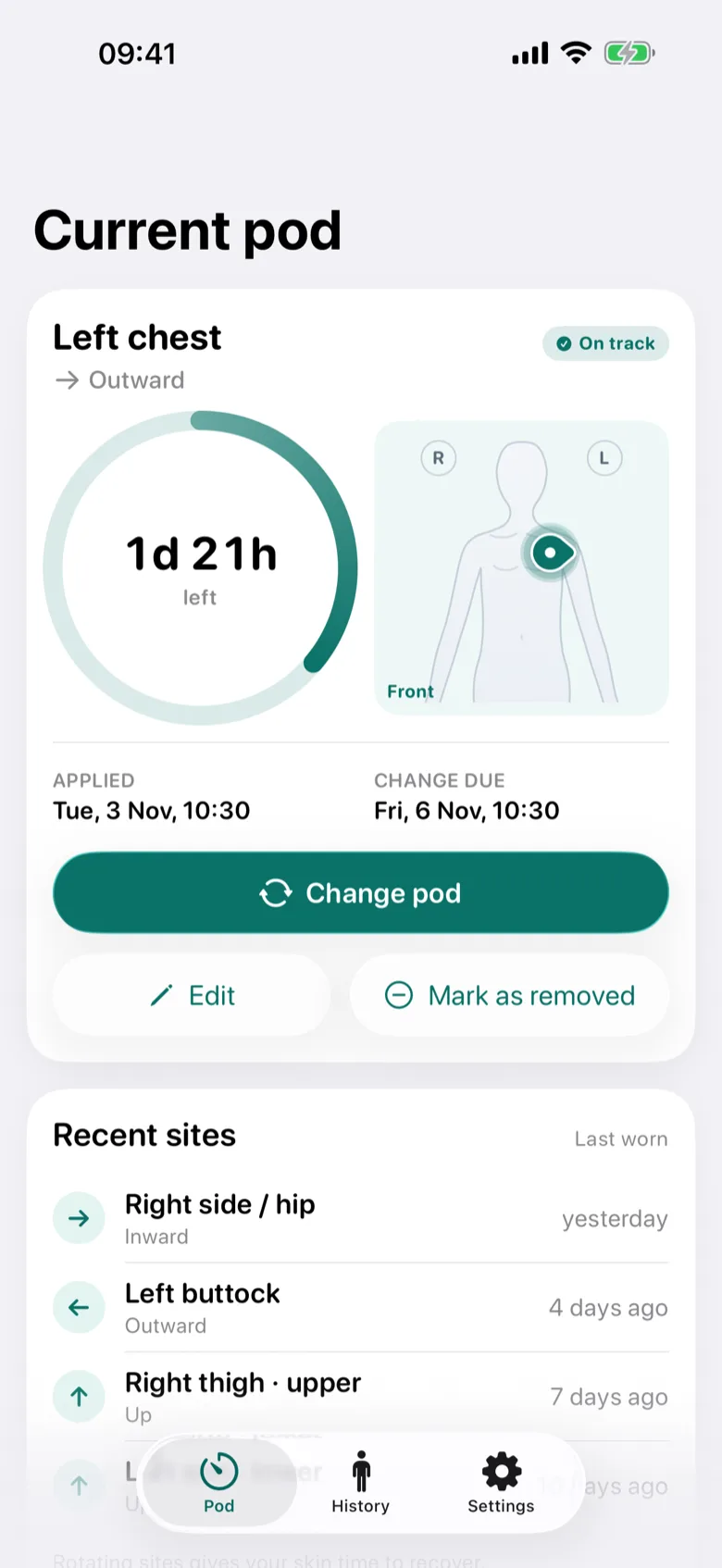
Log a pod
A new pod, logged in a few taps
Pick the site on the body map or from a list, choose the direction the pod points, and confirm the date and wear time.
- The date starts at now and the wear time at your usual one: 3 days (72 hours) unless you change it in Settings. Any wear time from 1 hour to 14 days can be set.
- On the whole-body map, a tap on a site that sits close to others zooms in on it first, so the right one is easier to pick.
- While you pick, the map shows how long ago each recently used site was last worn, and the site list says when each site was last worn.
- Wear times over 80 hours show a note that Omnipod pods stop delivering insulin 80 hours after activation.
- You can add a note to any pod.
Current pod
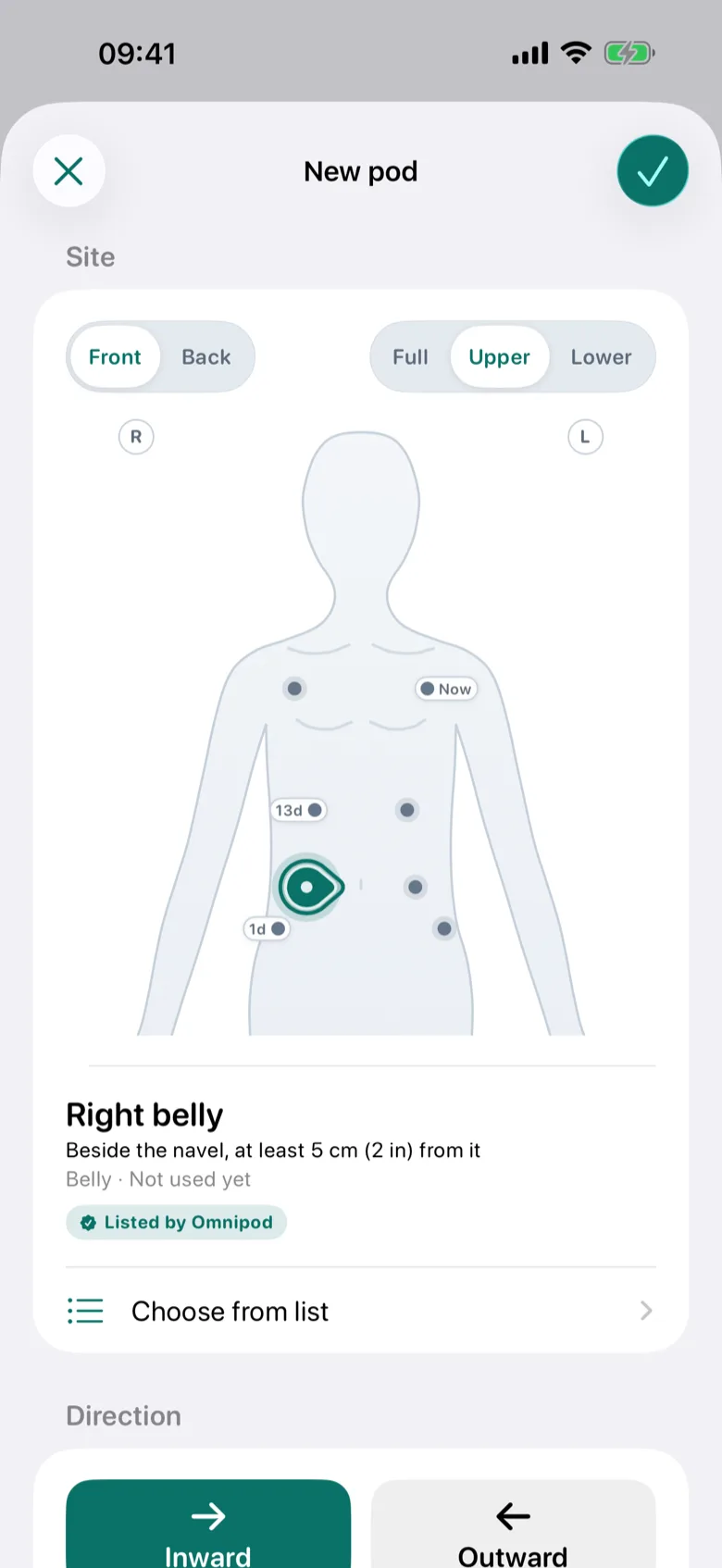
The current pod at a glance
The Current pod screen shows where the pod is and which way it points, when it went on, and a countdown to the change due by the wear time you planned, with your most recently used sites below.
Mark a pod as removed when you take it off without putting on a new one. Logging a new pod ends the current one for you.
The countdown follows the wear time you plan. SiteBuddy doesn’t connect to your pod, so your pump system’s own alerts remain the reference for pod changes.
The status of the current pod
- On track
Until the last 8 hours of the wear time you planned.
- Change soon
In those last 8 hours.
- Overdue
Past the planned change, with the time since: “Overdue by …”.
History
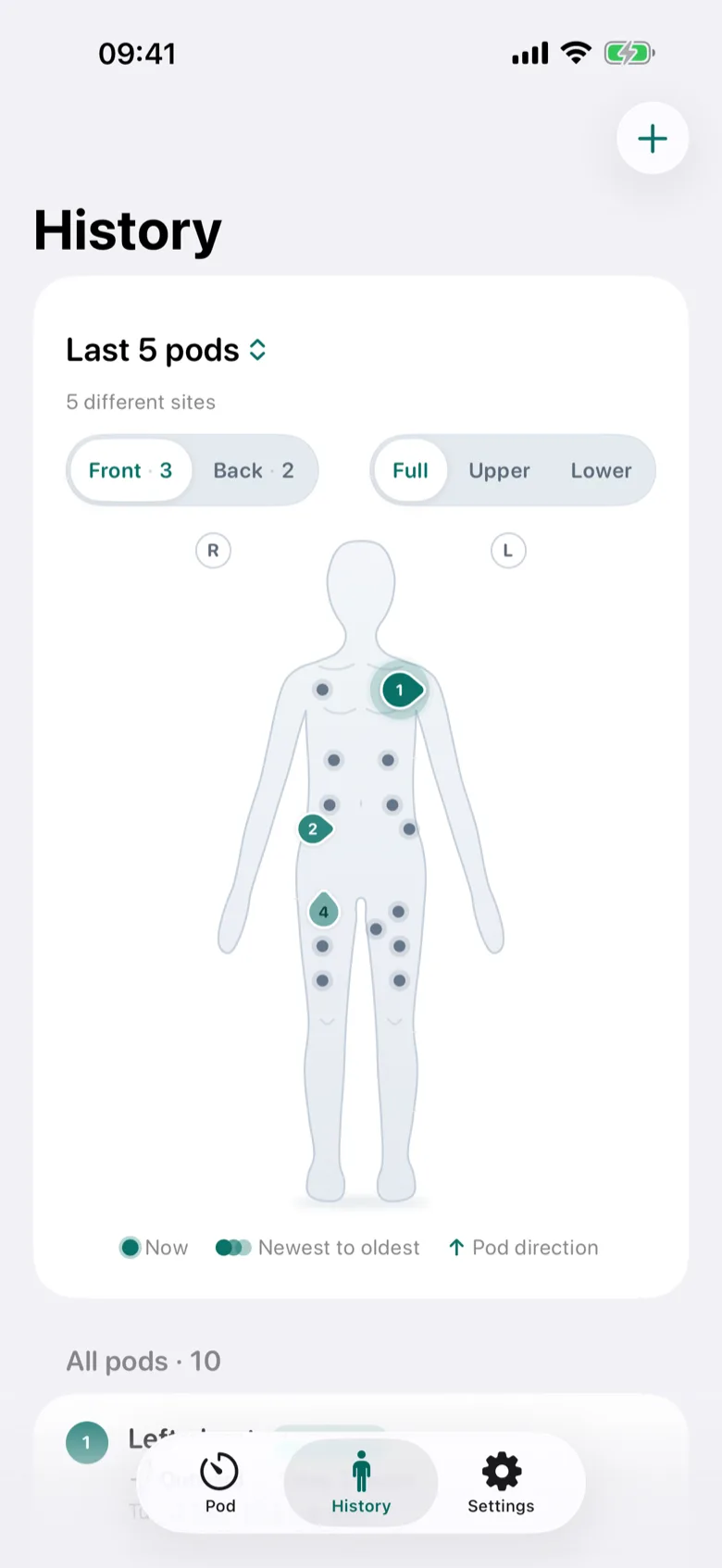
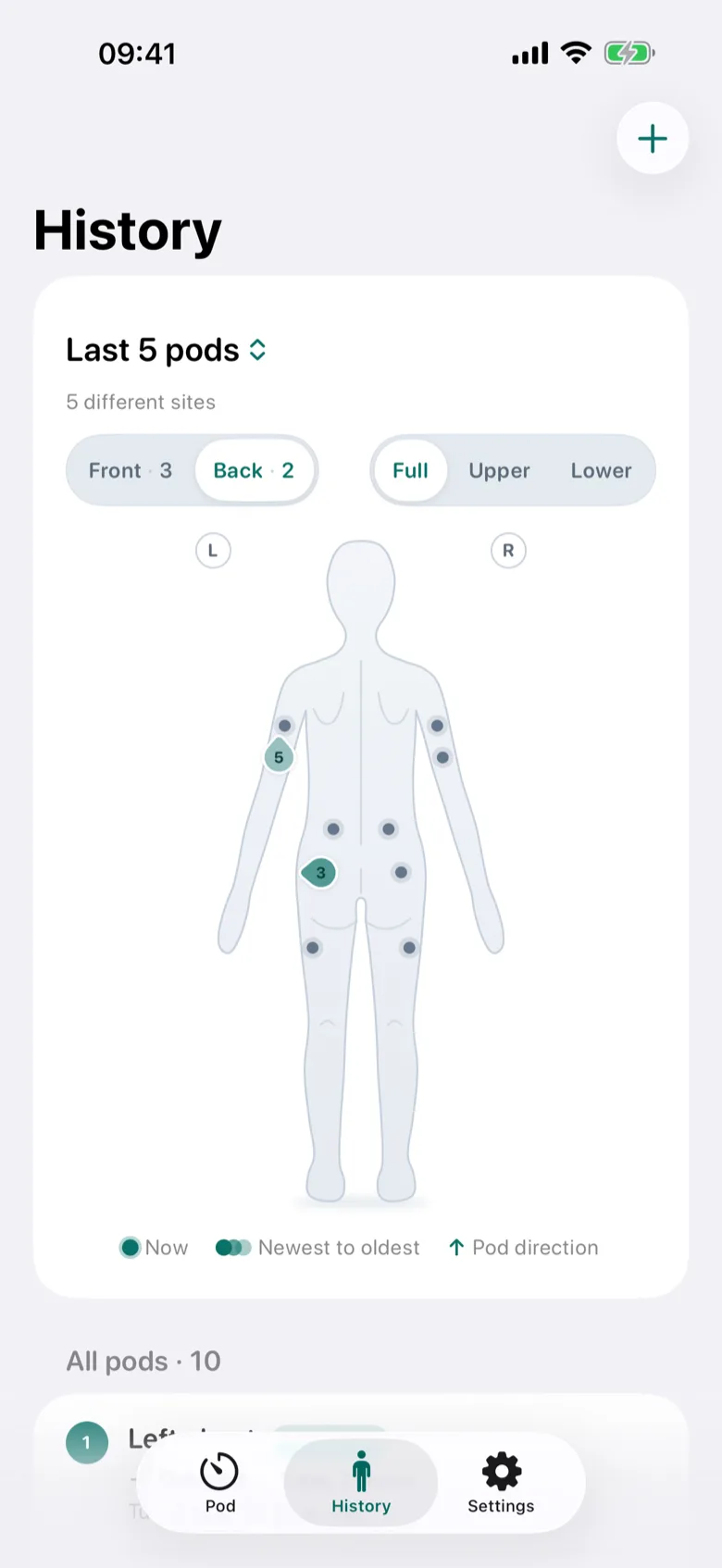
Your recent sites on a body map
Front and back views of the body, whole or zoomed to the upper or lower half, show your most recent sites: the last 5 pods by default, or as many as you choose. The newest are the strongest, and an arrow shows each pod’s direction.
Below the map, every pod is listed with its direction, how long it was worn and its note. Tap one to edit it, or swipe to delete it after a confirmation.
Body sites
An Omnipod‑first site catalog
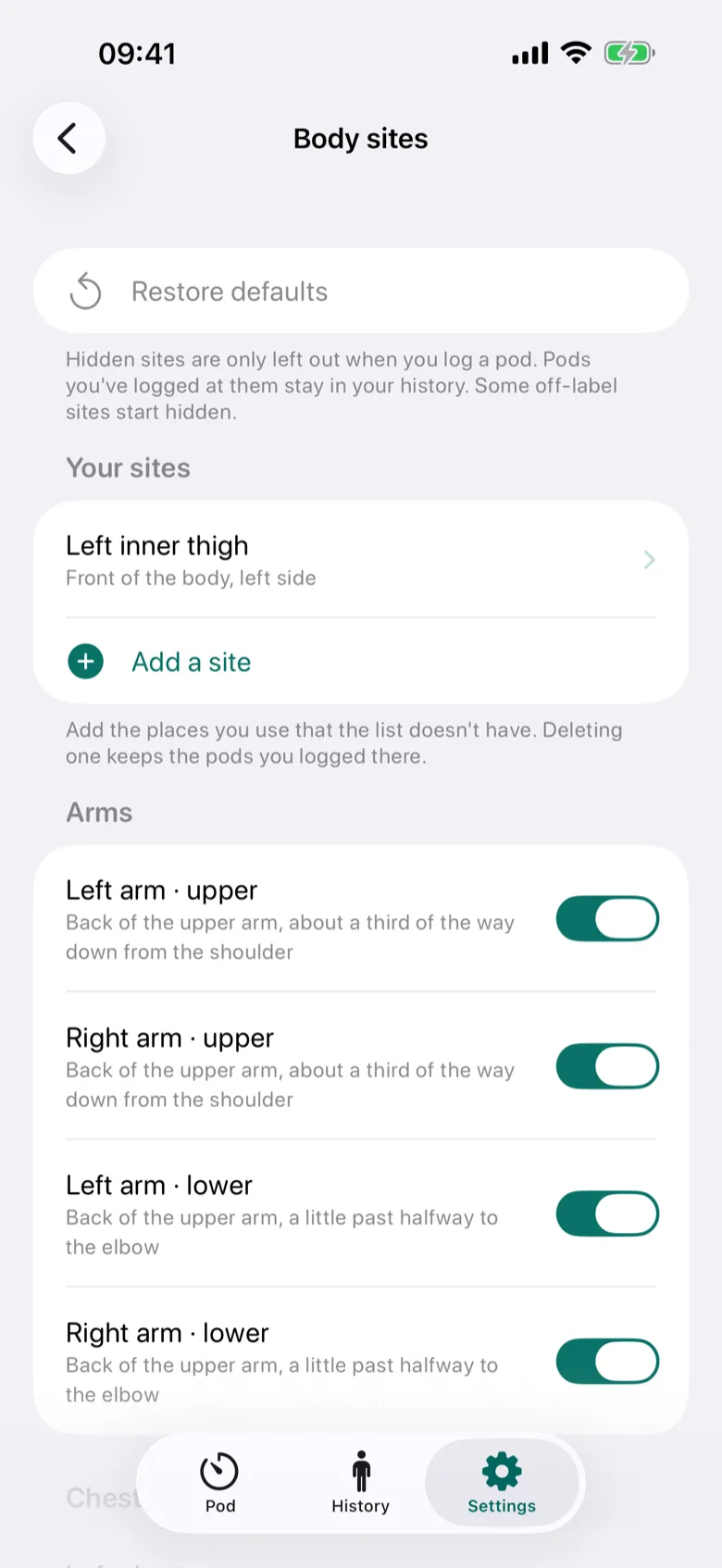
28 built-in sites, 14 on each side, across the arms, chest, upper back, belly, sides, lower back, buttocks, thighs and calves, chosen from a fact-checked research brief. Each site says where exactly it is and carries a label:
- Listed by Omnipod
- The area is one that Insulet’s placement guidance names.
- Off-label
- Some wearers report using the area, but Insulet’s documents don’t name it: the chest, upper back and calves.
The labels inform; they never block a choice. When you log a pod, the directions Insulet describes come first and one is pre-selected: up on the arms and legs, inward on the trunk. On the front thigh, inward and outward stay selectable, marked “Non-standard”.
In Settings → Body sites, show or hide any site. The off-label upper back and calves start hidden, and hidden sites stay in your history.
Your sites
Add the sites the catalog leaves out
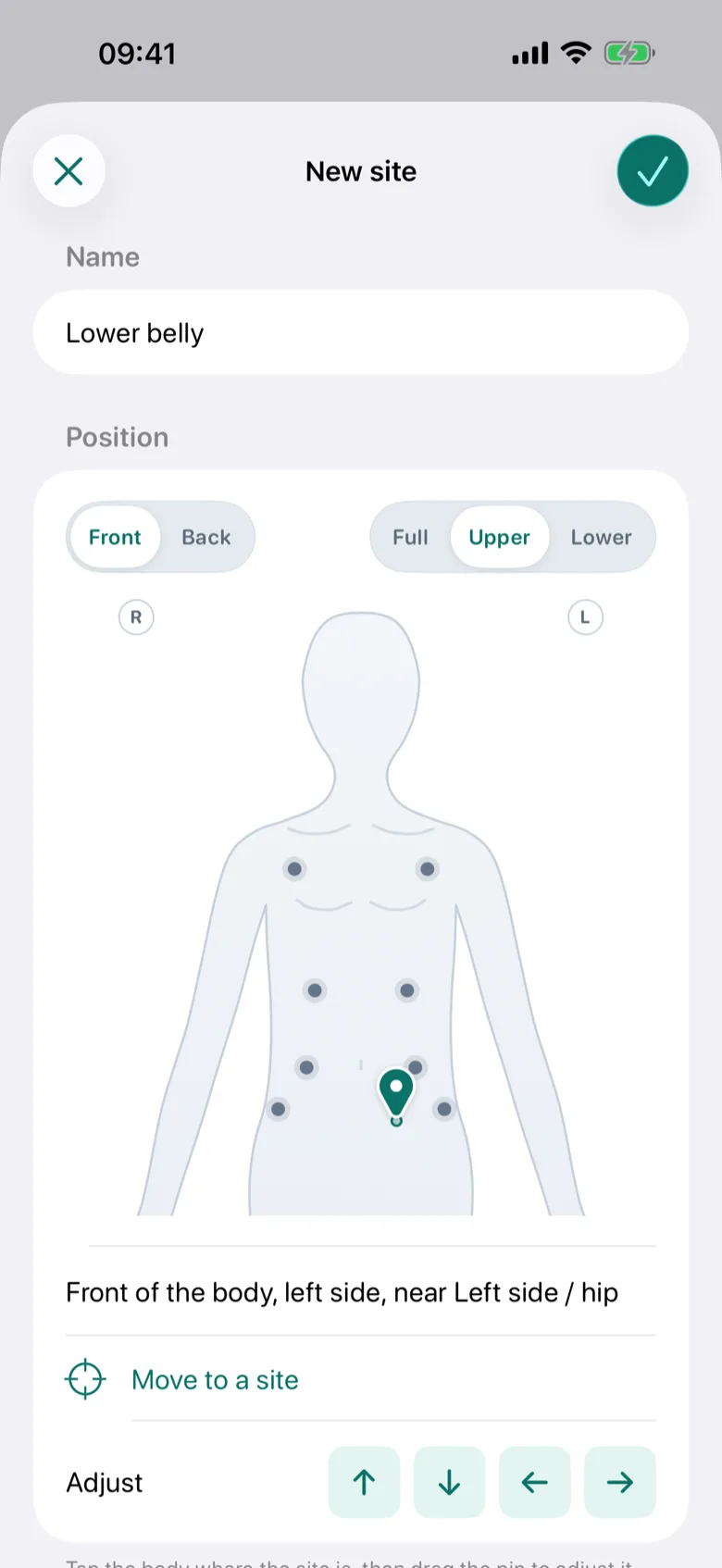
Give a site a name, tap where it is on the front or back of the body map and drag the pin to adjust it, then choose the directions you log there. Your sites appear on every map and in every list, labelled Your site. SiteBuddy has no guidance for them.
Add one in Settings → Body sites, or straight from the site list while you log a pod. Rename, move, hide or delete them later: deleting a site keeps its pods, and its name, in your history.
Privacy
Everything stays on your iPhone
SiteBuddy keeps your history only on your iPhone, in the app’s own storage. The developer never receives it.
-
No account
Nothing to sign up for, nothing to sign in to.
-
No network
The app makes no network requests.
-
No tracking
No analytics, no ads and no third-party code.
-
No iCloud sync
Your data lives in the app, so deleting the app deletes its data.
Accessibility and languages
Accessible, in English and Italian
Calm styling with WCAG AA contrast, Dark Mode, Increase Contrast, Dynamic Type and VoiceOver support.
-
Dark Mode and Increase Contrast
WCAG AA contrast in light and dark appearance, and deeper colours when Increase Contrast is on.
-
Dynamic Type
Text follows your text size, and list rows stack at the largest sizes.
-
VoiceOver and Voice Control
Labels throughout, and with VoiceOver, Switch Control or Voice Control a body-map site is chosen directly.
-
Comfortable controls
The app’s own controls are at least 44 points tall.
-
Reduce Motion
SiteBuddy follows the Reduce Motion setting.
-
English and Italian
SiteBuddy follows your iPhone’s language, including plurals, dates and VoiceOver. Other languages show English.
Not medical advice
SiteBuddy is a personal record-keeping tool. It is not a medical device, and it does not provide medical advice, diagnosis or treatment. It does not connect to, control or read from your pod, pump, controller or any other device.
- Always follow the instructions of your diabetes care team and the instructions for use that came with your pod or infusion set, including where you may place it and how often you should rotate.
- Site guidance labels (“Listed by Omnipod”, “Off-label”) summarize public information to help you have an informed conversation with your care team. They are not recommendations.
- Do not rely on SiteBuddy for pod-change timing. Your pump system’s own alerts remain the reference.
- If a site is red, swollen, painful or leaking, or your glucose is unexpectedly high, follow your care team’s advice. In an emergency, call your local emergency number.

Coming soon on the App Store
SiteBuddy isn’t available to download yet. Questions in the meantime? The support page has answers, and an email address.